1
2
3
| 虽然现在大部分公司使用的状态管理工具还是vuex4,但是pinia必然是大势所趋,pinia相当于vuex5
vuex官方文档:https://vuex.vuejs.org/zh/guide/
|
基本使用
介绍
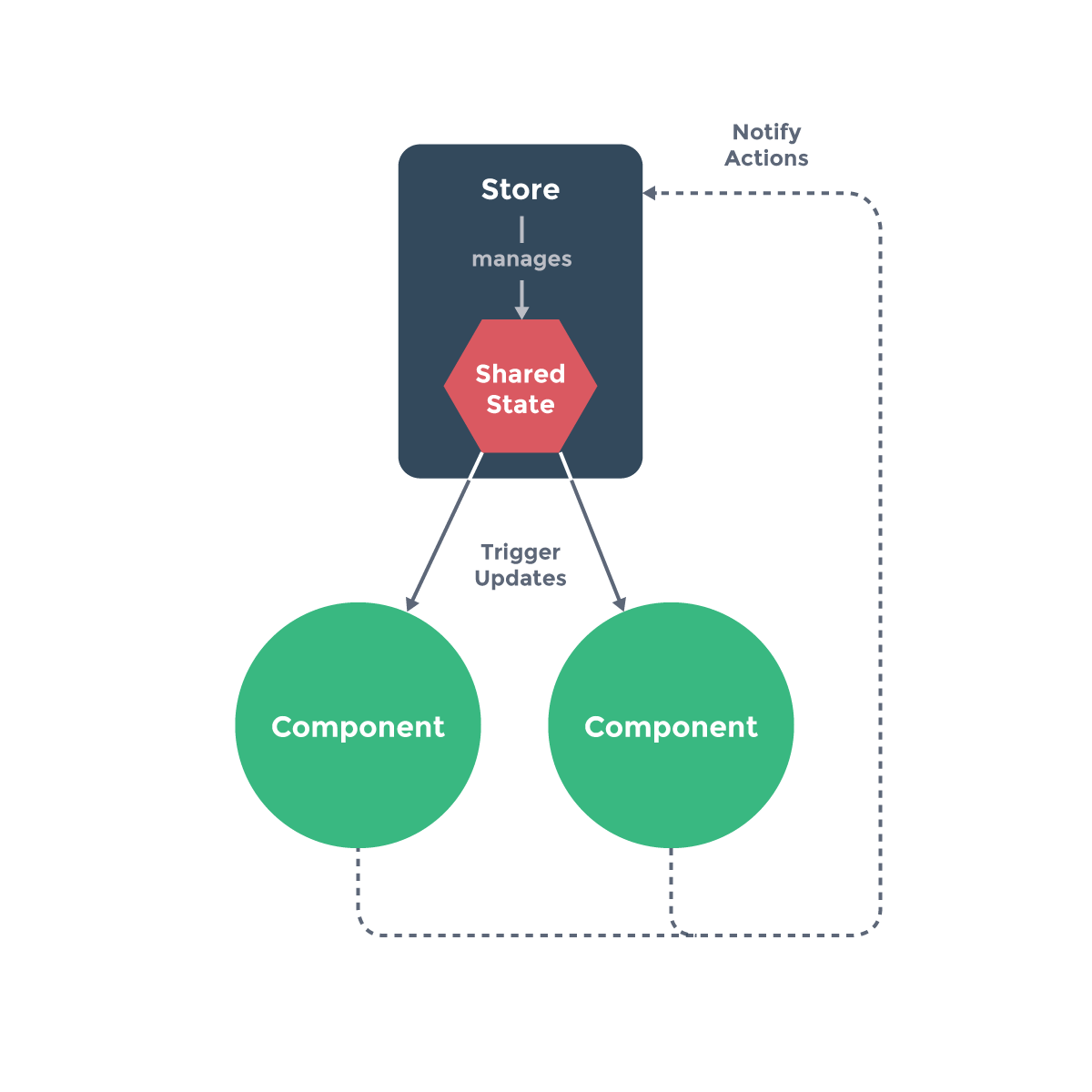
管理的什么?服务器返回的数据、缓存数据、用户操作产生的数据等,也包括一些UI的状态,比如某些元素是否被选中,是否显示加载动效,当前分页;
对于一些简单的状态,确实可以通过props的传递或者Provide的方式来共享状态,但是对于复杂的状态管理来说,显然单纯通过传递和共享的方式是不足以解决问题,这时候就要使用状态管理工具进行管理。
基本思想:
- 我们的组件树构成了一个巨大的 “试图View”;
- 不管在树的哪个位置,任何组件都能获取状态或者触发行为;
- 通过定义和隔离状态管理中的各个概念,并通过强制性的规则来维护视图和状态间的独立性,我们的代码边会变得更加结构化和易于维护、跟踪;
1
2
3
4
5
6
7
8
| title:Vuex和单纯的全局对象有什么区别呢?
第一:Vuex的状态存储是响应式的
- 当Vue组件从store中读取状态的时候,若store中的状态发生变化,那么相应的组件也会被更新;
第二:你不能直接改变store中的状态
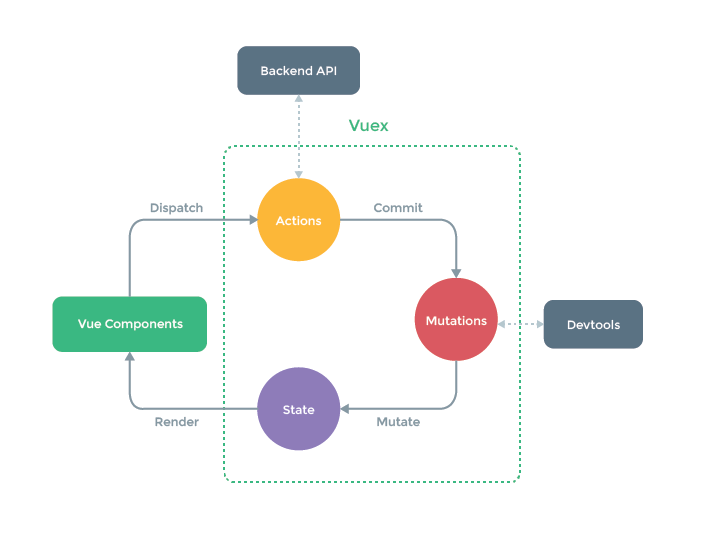
- 改变store中的状态的唯一途径就显示提交 (commit) mutation;
- 这样使得我们可以方便的跟踪每一个状态的变化,从而让我们能够通过一些工具帮助我们更好的管理应用的状态;
|
基本使用
安装
在文件夹src中创建store/index.js
src/store/index.js
1
2
3
4
5
6
7
| import { createStore } from 'vuex'
const store = createStore({
state: () => ({
counter: 0
})
})
|
==导入store==
main.js
1
2
3
| import store from './store'
app.use(store)
|
==使用==
template中使用
1
| <div>{{ $store.state.counter }}</div>
|
在计算属性中使用
1
2
3
4
5
6
7
| export default {
computed: {
storeCounter() {
return this.$store.state.counter
}
}
}
|
Composition API 的 setup 函数中使用
1
2
3
4
5
6
7
8
9
10
11
12
| import {useStore} from 'vuex'
const store = useStore()
function increment(){
console.log(store.state.counter)
store.commit("increment")
}
import { toRefs } from 'vue'
const { counter } = toRefs(store.state)
|
State
mutation
修改store中的数据需要手动提交mutations,而不是直接修改变量。(这个步骤在pinia中已经被废弃了)
store/index.js
1
2
3
4
5
6
7
8
9
10
11
12
13
| import { createStore } from 'vuex'
const store = createStore({
state: () => ({
counter: 0
}),
mutations: {
increment(state){
state.counter++
}
}
})
|
mapState
一般来讲都是映射到计算属性中。
假设我们有store:
store/index.js
1
2
3
4
5
6
7
8
| const store = createStore({
state: () => ({
counter: 0,
name: "codery",
level: 100,
avatarURL: "http://xxxx"
})
})
|
vue
==方法一==
1
2
3
|
<h2>name: {{ name }}</h2>
<h2>level: {{ level }}</h2>
|
1
2
3
| computed: {
...mapState(["name", "level", "avatarURL"]),
}
|
在setup中使用mapState
1
2
| <h2>name: {{ name }}</h2>
<h2>level: {{ level }}</h2>
|
1
2
3
4
5
6
7
8
9
10
11
| import { toRefs } from 'vue'
import { mapState, useStore } from 'vuex'
const store = useStore()
const { name, level } = toRefs(store.state)
function incrementLevel() {
store.state.level++
}
|
Getters
使用getters
数据需要一定的变化才能提供出去。
假设state中有一些朋友的信息,你要从这些信息中计算他们的年龄总数并用getters返回
store/index.js
1
2
3
4
5
6
7
8
9
10
11
12
13
14
| state: () => ({
friends: [
{ id: 111, name: "why", age: 20 },
{ id: 112, name: "kobe", age: 30 },
{ id: 113, name: "james", age: 25 }
],
}),
getters: {
totalAge(state) {
return state.friends.reduce((preValue, item) => {
return preValue + item.age
}, 0)
},
}
|
template中使用
1
| <h2>friendsTotalAge: {{ $store.getters.totalAge }}</h2>
|
getters的嵌套
1
2
3
| message(state, getters) {
return `name:${state.name} level:${state.level} friendTotalAge:${getters.totalAge}`
},
|
1
| <h2>message: {{ $store.getters.message }}</h2>
|
getters返回函数
1
2
3
4
5
6
7
|
getFriendById(state) {
return function(id) {
const friend = state.friends.find(item => item.id === id)
return friend
}
}
|
1
| <h2>id-111的朋友信息: {{ $store.getters.getFriendById(111) }}</h2>
|
mapGetters
1
2
3
| <h2>doubleCounter: {{ doubleCounter }}</h2>
<h2>friendsTotalAge: {{ totalAge }}</h2>
<h2>message: {{ message }}</h2>
|
1
2
3
4
5
6
7
8
| import { mapGetters } from 'vuex'
export default {
computed: {
...mapGetters(["doubleCounter", "totalAge"]),
...mapGetters(["getFriendById"])
}
}
|
Mutations
重要的原则: 不要在mutation方法中执行异步操作
更改 Vuex 的 store 中的状态的唯一方法是提交 mutation:
mutation携带数据
mutation-type.js 定义常量
1
| export const CHANGE_INFO = "changeInfo"
|
定义mutations
1
2
3
4
5
6
7
8
9
10
11
| import { CHANGE_INFO } from './mutation_types'
mutations: {
changeName(state, payload) {
state.name = payload
},
[CHANGE_INFO](state, newInfo) {
state.level = newInfo.level
state.name = newInfo.name
},
},
|
使用mutations
1
2
3
4
5
6
7
8
9
| changeName() {
this.$store.commit("changeName", "王小波")
},
changeInfo() {
this.$store.commit(CHANGE_INFO, {
name: "王二",
level: 200
})
}
|
mapMutations
有点麻烦,略。
Actions
Action提交的是mutation,而不是直接变更状态;Action可以包含任意异步操作;
Action的参数是context
- context是一个和store实例均有相同方法和属性的context对象;
- 所以我们可以从其中获取到commit方法来提交一个mutation,或者通过 context.state 和 context.getters 来获取 state 和 getters;
actions的分发操作
action的调用方式是“分发” dispatch
==定义actions==
1
2
3
4
5
6
7
8
| actions: {
incrementAction(context) {
context.commit("increment")
},
changeNameAction(context, payload) {
context.commit("changeName", payload)
},
}
|
==分发操作:==
1
2
3
4
5
6
| counterBtnClick() {
this.$store.dispatch("incrementAction")
},
nameBtnClick() {
this.$store.dispatch("changeNameAction", "aaa")
}
|
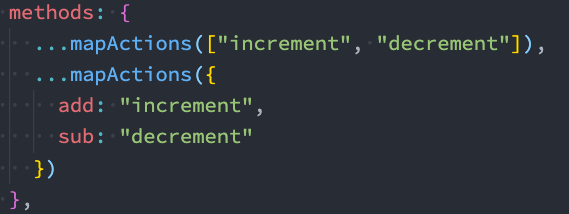
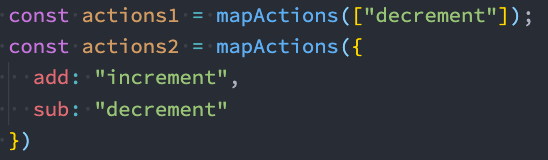
action也有辅助函数
具体写法和state、getters相同
actions的异步操作
我们可以通过让action返回Promise,在Promise的then中来处理完成后的操作;
store/index.js
1
2
3
4
5
6
7
8
9
10
11
12
13
14
15
| actions: {
fetchHomeMultidataAction(context) {
return new Promise(async (resolve, reject) => {
const res = await fetch("http://123.207.32.32:8000/home/multidata")
const data = await res.json()
context.commit("changeBanners", data.data.banner.list)
context.commit("changeRecommends", data.data.recommend.list)
resolve("aaaaa")
})
}
}
|
vue
1
2
3
4
5
6
7
| import { useStore } from 'vuex'
const store = useStore()
store.dispatch("fetchHomeMultidataAction").then(res => {
console.log("home中的then被回调:", res)
})
|
Modules
什么是Module?
- 由于使用单一状态树,应用的所有状态会集中到一个比较大的对象,当应用变得非常复杂时,store 对象就有可能变得相当臃肿;
- 为了解决以上问题,Vuex 允许我们将 store 分割成模块(module);
- 每个模块拥有自己的 state、mutation、action、getter、甚至是嵌套子模块;
store/modules/counter.js
1
2
3
4
5
6
7
8
9
10
11
12
13
14
15
16
17
18
19
20
21
22
23
24
25
| const counter = {
namespaced: true,
state: () => ({
count: 99
}),
mutations: {
incrementCount(state) {
console.log(state)
state.count++
}
},
getters: {
doubleCount(state, getters, rootState) {
return state.count + rootState.rootCounter
}
},
actions: {
incrementCountAction(context) {
context.commit("incrementCount")
}
}
}
export default counter
|
store/modules/home.js
1
2
3
4
5
6
7
8
9
10
11
12
13
14
15
16
17
18
19
20
21
22
23
24
25
26
27
28
29
30
| export default {
state: () => ({
banners: [],
recommends: []
}),
mutations: {
changeBanners(state, banners) {
state.banners = banners
},
changeRecommends(state, recommends) {
state.recommends = recommends
}
},
actions: {
fetchHomeMultidataAction(context) {
return new Promise(async (resolve, reject) => {
const res = await fetch("http://123.207.32.32:8000/home/multidata")
const data = await res.json()
context.commit("changeBanners", data.data.banner.list)
context.commit("changeRecommends", data.data.recommend.list)
resolve("aaaaa")
})
}
}
}
|
store/index.js
1
2
3
4
5
6
7
8
9
10
11
12
13
14
15
16
17
| import homeModule from './modules/home'
import counterModule from './modules/counter'
const store = createStore({
state: () => ({
}),
getters: {
},
mutations: {
},
actions: {
},
modules: {
home: homeModule,
counter: counterModule
}
})
|
使用:
==不带命名空间==:
1
2
3
4
|
<h2>Counter模块的counter: {{ $store.state.counter.count }}</h2>
<h2>Counter模块的doubleCounter: {{ $store.getters.doubleCount }}</h2>
|
1
2
3
4
5
|
function incrementCount() {
store.dispatch("incrementCountAction")
}
|
==带有命名空间==:
【本例的counter.js中namespace:true】
1
2
3
4
|
<h2>Counter模块的counter: {{ $store.state.counter.count }}</h2>
<h2>Counter模块的doubleCounter: {{ $store.getters["counter/doubleCount"] }}</h2>
|
1
2
3
4
5
6
7
8
9
| import { useStore } from 'vuex'
const store = useStore()
function incrementCount() {
store.dispatch("counter/incrementCountAction")
}
|