
MyBatis
概述
三层架构
| 名称 | 作用 | 对应的包 | 对应的框架 |
|---|---|---|---|
| 界面层 | 和用户打交道,接受用户请求参数,显示处理结果 | controller | SpringMVC |
| 业务逻辑层 | 接受界面层传递的数据,计算逻辑,调用数据库,获取数据 | service | Spring |
| 数据访问层 | 访问数据库,执行CRUD | dao | MyBatis |
用户使用界面层->业务逻辑层->数据访问层(持久层)->数据库
MyBatis有什么用?
- 提供了创建connection,statement,Resultset的能力,不用开发人员创建这些对象了
- 提供了执行sql语句的能力,不用你执行sql
- 提供了循环sql,把sql的结果转为java对象,List集合的能力
- 提供了关闭资源的能力,不用你关闭Connection,Statement,Resultset
总结:
mybatis是一个sql映射框架,提供的数据库的操作能力。是一个增强的JDBC,使用mybatis让开发人员集中精神写sql就可以了,不必关心Connection,Statement,Resultset的创建,销毁,sql的执行。
MyBatis快速入门
对应文件:Learning/JavaWeb/Mabatis/1.Hello-Mybatis
实现步骤
- 新建的student表
- 加入maven的mybatis依赖,mysql驱动依赖
- 创建实体类,student–保存表中的一行数据的
- 其中,成员变量名和表中的数据类型一样
- 实体类名和表名一样
- 创建持久层的dao接口,定义操作数据库的方法
- 创建一个mybatis使用的配置文件叫做sql映射文件:写sql语句的。一般一个表一个sql映射文件。这个文件是xml文件。
- 在接口所在的目录中
- 文件名和接口保持一致
- 创建mybatis的主配置文件:一个项目就一个主配置文件。主配置文件提供了数据库的连接信息和sql映射文件的位置信息
- 位置:maven的位置为
src/main/resources,没有就创建
- 位置:maven的位置为
- 创建使用mybatis类,通过mybatis访问数据库
创建sql映射文件
1 | <!-- |
创建主配置文件
复制粘贴以下内容,注意配置相关的参数
1 |
|
如果在maven的src/main目录下面手动添加了resources,则应该在pom.xml中加上以下语句:
如果没有手动添加,就不用加第二个resource标签里面的内容
作用:使配置文件在编译的时候不会被挪走
1 |
|
第一个查询程序
创建 IStudentDao 接口,并在其中添加查找函数
1 | public interface IStudentDao { |
IStudentDao.xml 中添加
1 | <select id="queryAllStudent" resultType="com.Jancoyan.Domain.Student"> |
mybatis.xml 中添加
1 | <mapper resource="com/Jancoyan/Dao/IStudentDao.xml"/> |
测试方法:
1 | public static void main(String[] args) { |
第一个插入程序
IStudentDao 接口中添加
1 | public interface IStudentDao { |
IStudentDao.xml 中添加语句
- 其中参数用占位符表示,占位符中是实体类的属性名
1 | <insert id="insertStudent" > |
注意:MyBaits不会自动提交事务,所以我们要手动提交事务
1 |
|
扩展:IDEA的文件模板
直接创建新建文件的模板
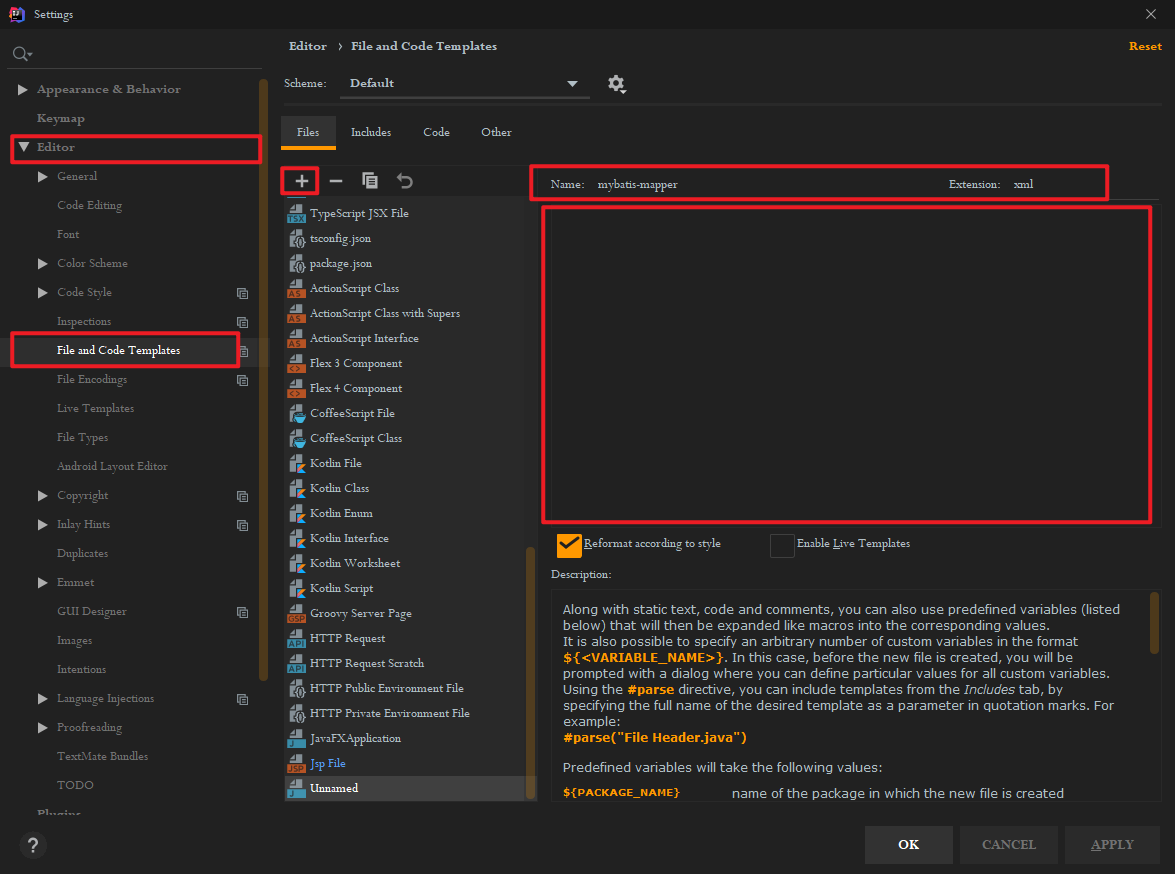
以后在创建文件的时候可以直接选择这个模板对应的文件了
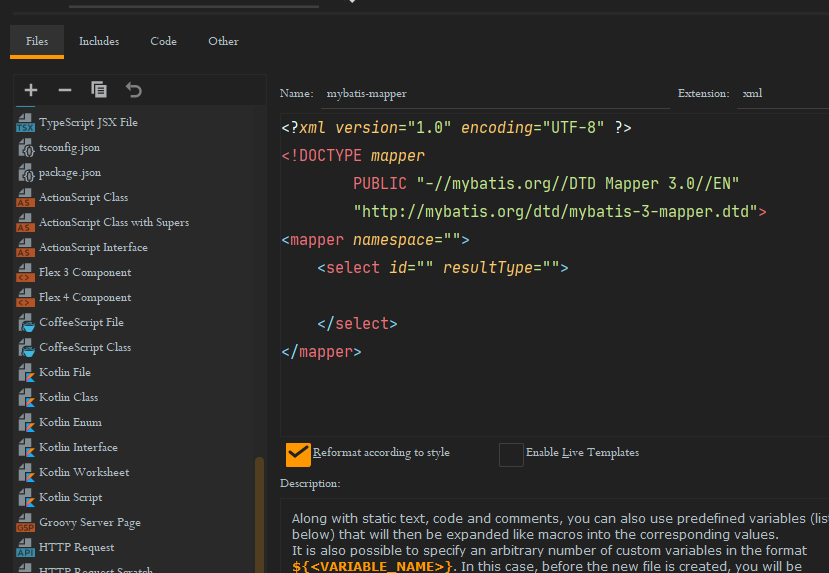
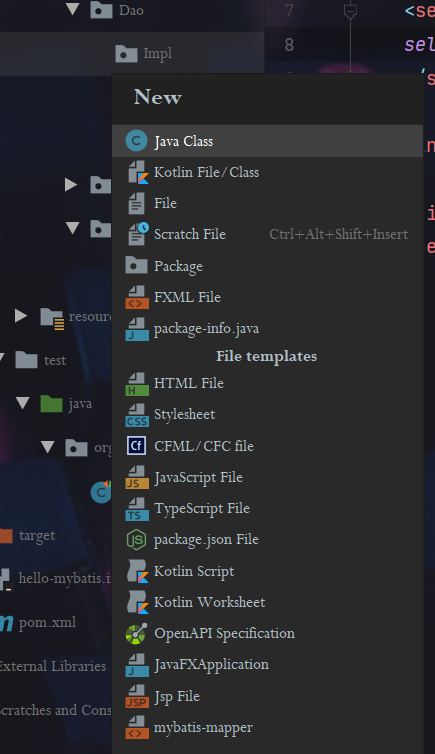
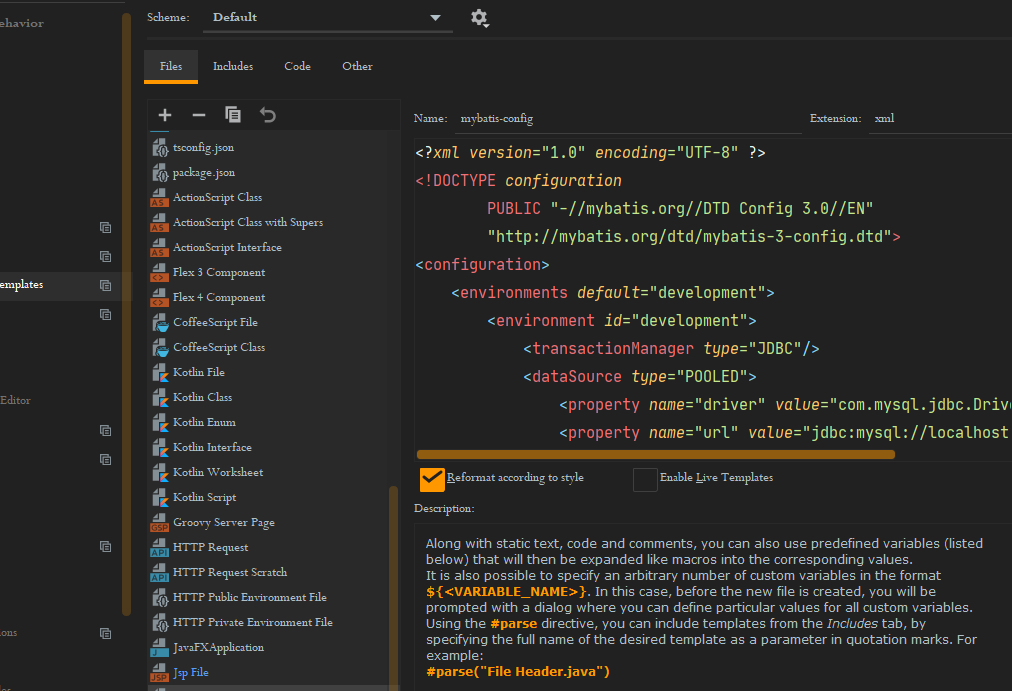
同样的方法创建了主配置文件mybatis-config
设置在控制台上输出运行日志
在mybatis.xml中添加
注意 : 这个属性必须添加在 configration标签中,并且位置一定只在 properties 的下面,在其他标签的上面,顺序不能错!!
1 | <settings> |
主要类的介绍
1)Resources : mybatis中的一个类,负责读取主配置文件
1 | Inputstream in=Resources.getResourceAsstream("mybatis.xml"); |
2)SqlessionFactoryBuilder:创建sqlsessionFactory对象,
1 | SqlSessionFactoryBuilder builder=new sqlsessionFactoryBuilder(); |
3)sqlsessionFactory:重量级对象,程序创建一个对象耗时比较长,使用资源比较多。 在整个项目中,有一个就够用了。
SqlsessionFactory:接口
接口实现类:DefaultscqlsessionFactory
作用: 获取sqlsession对象。sqlsession sqlsession=factory.opensession();
opensession()方法说明:
- opensession():无参数的,获取是非自动提交事务的sqlsession对象
- openSession(boolean):opensession(true)获取自动提交事务的sqlsession ; opensession(false)非自动提交事务的sqlsession对象
4) SqlSession:
接口,定义了操作数据的方法,例如 selectOnt(), SelectList(), insert(), update()等
实现类为 DefaultSqlSession
使用要求:SqlSession对象不是线程安全的,需要在方法的内部使用,在执行sql语句之前,使用openSession()获取SqlSession,在执行完sql语句之后需要关闭,这样能保证他是线程安全的
MyBatisUtils工具类
- 用来获取SqlSession
1 | package com.Jancoyan.Utils; |
有了这个工具类之后,只需要使用工具类来获取SqlSession即可
拿上面的第二个例子来说:
1 |
|
Dao代理【重点】
实现数据库操作
mybatis根据dao方法的调用获取执行sql语句的信息。mybatis根据你的dao接口创建出一个dao接口的实现类,并创建这个类的对象,完成SqlSession方法访问数据库。
不需要再写接口的实现类!!!
只需要写接口和对应的sql映射文件,使用mybatis的动态代理机制,使用SqlSession.getMapper(Dao接口.class),就能获取dao接口对应于实现类的对象
1 |
|
理解映射文件的参数
[了解]parameterType
写在,mapper文件中的一个属性,表示dao接口中方法的参数类型。他的值是java数据类型全名称或者是mybatis定义的别名 - 在mybatis帮助文档中可以查看
注意:这个属性不止是强制的,mybatis通过反射机制能够发现接口参数的数据类型,所以可以没有,一般我们也不写
[掌握]一个简单参数(Java基本类型和字符串都是简单类型)
获取简单类型的参数值,格式为: #{任意字符串}
深入理解:使用#{}之后,mybatis使用的jdbc中的PreparedStatment对象,由Mybatis执行以下代码:
1 | // 假设查询返回一个学生对象 |
[掌握]多个参数-使用@param[官方推荐]
多个参数,在接口的形参前面加上 @param,mapper文件中就可以直接使用这个名称来占位
1 | // IStudentDao.java |
1 | <!-- IStudentDao.xml --> |
[掌握]多个参数-使用对象
mapper文件中的占位符与类中的属性和数据库表的属性一一对应
1 | // IStudentDao.java |
1 | <!--IStudentDao.xml--> |
1 | // Test |
[掌握] # 和 $
首选方案是 #
- 安全性高,避免SQL注入
- 效率高
不建议使用 $
#表示占位符‘?’ 使用的是PreparedStatement
而$表示字符串的拼接,使用的是 Statement,安全性低,而且用起来比较麻烦
当你能保证sql语句是绝对安全的时候就可以使用$,比如替换列名或者表名:
用一个函数实现根据任意字段排序
1 | // IStudentDao.java |
1 | <!--IStudentDao.xml--> |
1 | // test |
总结:
#使用?在sq1语句中做站位的,使用PreparedStatement执行sql,效率高#能够避免sql注入,更安全。- $不使用占位符,是字符串连接方式,使用Statement对象执行sql,效率低
- $有sql注入的风险,缺乏安全性。
- $:可以替换表名或者列名
resultType结果封装
resultSet是mybatis的输出结果,是mybatis执行了sql语句,得到的java对象。
resultType结果类型,指sql执行完毕后,数据转为的java对象,类型是任意的,只要能转化就行。
resultType值可以是全限定名称,也可以是别名, 或者自定义别名
处理方式:
mybatis执行sql语句,然后mybatis调用类的无参数构造方法,创建对象。
mybatis把ResultSet指定列值赋值给同名的属性,多余的或者不同的会忽略掉
如果是基本数据类型,可以放别名(int/double等)也可以放类型的全限定名称(java.lang.Integer/ java.lang.Double)
定义自定义类型的别名:
方法一: 为某个类指定别名
在主配置文件 mybatis.xml 中的typeAliases标签中设置别名,这个标签写在environments 的上面,settings的下面
1 | <!--mybatis.xml--> |
方法二:为某个包中的所有类指定别名,别名为类的名称,不区分大小写**[实际开发中使用居多]**
1 | <!--mybatis.xml--> |
如果有两个包中的两个类名是一样的,则会报错,此时应该使用全限定名名称
如果结果返回map,则只能返回一行,不建议使用map接受返回值。
resultMap结果映射,指定列名和java对象的属性对应关系
- 自定义列值赋值给哪个属性
- 当列名和属性名不一样的时候一定使用resultMap
使用resultMap:
- 先定义resultMap(可以复用)
- 再在select标签中使用resultMap来引用定义
1 | <!-- |
注意:resultMap 和 resultType 不能一起用
逆向思维,如果列名和属性名不一样,有哪些方法可以获取参数值?
- 定义resultMap,不同的列赋给不同的属性
- 【推荐】在sql语句中给列起别名 selece name as stuName…
模糊查询
- 在java代码中指定like的内容【推荐】
1 | // IStudentDao.java |
1 | <!--IStudentDao.xml--> |
1 | // test |
- 在mapper中拼接
接口定义和第一种一样
1 | <!--IStudentDao.xml--> |
1 | // test |
动态SQL【理解】
动态sql: sql的内容是变化的,可以根据条件获取到不同的sql语句。主要是where部分发生变化。
动态sql的实现,使用的是mybatis提供的标签 <if> ,<where>,<foreach>
- < if >是判断条件的, 语法< if test=”判断java对象的属性值” >部分sql语句 < /if>
- < where > 用来包含 多个< if >的, 当多个if有一个成立的, < where >会自动增加一个where关键字,并去掉 if中多余的 and ,or等。这样就不用在语句中多写一个 where 1 = 1 了
- < foreach > 循环java中的数组,list集合的。 主要用在sql的in语句中。
< if >
1 | // IStudentDao.java |
注意!!!!
在这里多写了一句 where 1 = 1 是为了防止第一个if匹配失败而第二个if匹配成功时,sql语句发生的语法错误。加上之后就不会出错了。
1 | <!--IStudentDao.java--> |
1 | // test |
< where >
1 | // IStudentDao.java |
1 | <!--IStudentDao.xml--> |
1 | // test |
< foreach >
语法:
1 | <foreach collection="" item="" open="" close="" separator=""> |
collection:表示接口中的方法参数的类型, 如果是数组使用array , 如果是list集合使用list
item:自定义的,表示数组和集合成员的变量
open:循环开始是的字符
close:循环结束时的字符
separator:集合成员之间的分隔符
1 | // IStudentDao.java |
1 | <!--IStudentDao.xml--> |
1 | // test |
SQL代码片段
sql代码片段, 就是复用一些语法
步骤
- 先定义 < sql id=”自定义名称唯一” > sql语句, 表名,字段等 < /sql>
- 再使用, < include refid=”id的值” />
1 | <sql id="sql_1"> |
数据库配置文件
在resource目录下创建属性配置文件,将数据库信息都放到同一个文件中。和Mybatis主配置文件分开,便于修改和保存。
文件的内容为 key=value,目的是便于修改和保存,处理数据,建议key写多级目录,比如
1 | jdbc.driver=com.mysql.jdbc.Driver |
MyBatis逆向工程 - MyBatis Generator的使用
添加依赖 、引入jar包
1
2
3
4
5
6
7
8
9<!-- pom.xml -->
<!-- MBG -->
<!-- https://mvnrepository.com/artifact/org.mybatis.generator/mybatis-generator-core -->
<dependency>
<groupId>org.mybatis.generator</groupId>
<artifactId>mybatis-generator-core</artifactId>
<version>1.3.5</version>
</dependency>在项目主目录下创建
mbg.xml(也就是和pom.xml一个目录)MyBatis Generator 官方给出了xml文件的示例 http://mybatis.org/generator/configreference/xmlconfig.html, 我们只需要在这基础上稍作修改。
以下是我修改之后的配置文件:
1
2
3
4
5
6
7
8
9
10
11
12
13
14
15
16
17
18
19
20
21
22
23
24
25
26
27
28
29
30
31
32
33
34
35
36
37
38
39
40
41
42
43
44
45
46
47
48
49
50
51
52
53
54
<generatorConfiguration>
<context id="DB2Tables" targetRuntime="MyBatis3">
<!-- 设置不生成注释,可写,可不写-->
<commentGenerator>
<property name="suppressAllComments" value="true"/>
</commentGenerator>
<!-- 配置数据库连接-->
<jdbcConnection driverClass="com.mysql.jdbc.Driver"
connectionURL="jdbc:mysql://localhost:3306/ssm"
userId="root"
password="333">
</jdbcConnection>
<javaTypeResolver >
<property name="forceBigDecimals" value="false" />
</javaTypeResolver>
<!-- JavaBean生成的位置-->
<javaModelGenerator targetPackage="com.Jancoyan.domain"
targetProject="./src/main/java">
<property name="enableSubPackages" value="true" />
<property name="trimStrings" value="true" />
</javaModelGenerator>
<!-- mapper文件生成的位置-->
<sqlMapGenerator targetPackage="mapper"
targetProject="./src/main/resources">
<property name="enableSubPackages" value="true" />
</sqlMapGenerator>
<!-- DAO文件生成的位置-->
<javaClientGenerator type="XMLMAPPER"
targetPackage="com.Jancoyan.dao"
targetProject="./src/main/java">
<property name="enableSubPackages" value="true" />
</javaClientGenerator>
<!-- 表相关数据-->
<!-- tableName表示需要生成的表名字
domainObjectName 表示生成的类名-->
<table tableName="tbl_dept" domainObjectName="Department" />
<table tableName="tbl_emp" domainObjectName="Employee" />
</context>
</generatorConfiguration>相关标签解释:
jdbcConnection 配置数据库连接
- 标签是自己的数据库配置信息
javaModelGenerator 指定JavaBean生成的位置
- targetPackage: 需要生成的包
- targetProject: 指定生成的位置
sqlMapGenerator 指定SQL映射文件生成位置
- targetPackage: 需要生成的包
- targetProject: 指定生成的位置
javaClientGenerator 指定DAO接口生成的位置
- targetPackage: 需要生成的包
- targetProject: 指定生成的位置
table 指定每个表的生成策略
- tableName属性 需要逆向生成的表名
- domainObjectName 生成的类名
编写Java文件运行生成相关类
1
2
3
4
5
6
7
8
9
10
11
12
13
14
15
16
17
18
19
20
21
22
23package com.Jancoyan.test;
import org.mybatis.generator.api.MyBatisGenerator;
import org.mybatis.generator.config.Configuration;
import org.mybatis.generator.config.xml.ConfigurationParser;
import org.mybatis.generator.internal.DefaultShellCallback;
import java.io.File;
import java.util.ArrayList;
import java.util.List;
public class MBGTest {
public static void main(String[] args) throws Exception {
List<String> warnings = new ArrayList<String>();
boolean overwrite = true;
File configFile = new File("mbg.xml"); // 自己的配置文件的名称
ConfigurationParser cp = new ConfigurationParser(warnings);
Configuration config = cp.parseConfiguration(configFile);
DefaultShellCallback callback = new DefaultShellCallback(overwrite);
MyBatisGenerator myBatisGenerator = new MyBatisGenerator(config, callback, warnings);
myBatisGenerator.generate(null);
}
}运行成功之后就生成了相关类。